> For the complete documentation index, see [llms.txt](https://help.clause9.com/llms.txt). Markdown versions of documentation pages are available by appending `.md` to page URLs; this page is available as [Markdown](https://help.clause9.com/clauses/parameters.md).
# Parameters
{% hint style="info" %}
Parameters are an advanced subject that is only relevant to users who frequently have to draft complex clauses & documents.
{% endhint %}
Parameters are a tool that can be used in Clause9 grammar to make the use of [snippets](/clauses/snippets.md) even more flexible. They function as a kind of placeholder.
Whereas snippets already enable you to replace a piece of text that is used multiple times across a clause or across several clauses/documents, combining snippets with parameters further upgrades the re-usability of a snippet by enabling you to replace the placeholder(s) in a snippet with different input each time you use the snippet.
## How to use parameters
### Insert the parameter as a placeholder in a snippet
Parameters are written starting with a question mark, followed by a name of your choice in all caps. For example: `?NAME` or `?TYPE`. Written as such, the parameter should be used in the (internal or external) snippet as a placeholder for input that can be chosen elsewhere (i.e. where the snippet itself is being referenced).
### Give the parameter a value in the snippet reference
Without a value, the parameter in the snippet itself will give an error message (the name of the parameter surrounded with a purple background). So to be of any use, it should be assigned a value. That is done in the snippet reference.
The grammar for this is as follows: insert the snippet reference, followed by left parenthesis `(`. Insert the name of the (first) parameter. To assign it a value, insert `:=` followed by the relevant value. Multiple parameters can be assigned a value in one snippet reference by separating them with a comma. Close the reference off with right parenthesis `)`. The result looks like this:
* for an **internal snippet**: `@SNIPPET-REFERENCE(?PARAMETER1 := value1, ?PARAMETER2 := value2)`
* for an **external snippet**: `@#snippet-reference(?PARAMETER1 := value1, ?PARAMETER2 := value2)`
(The only difference between these references is the way internal and external snippets themselves are referenced)
### Types of values
The parameter can get nearly any value that results in a piece of text. The most important limitations are that a parameter value itself cannot be (i) plain text or (ii) a condition (however, note that use of the `@if` [special function](/special-functions/introduction.md) is allowed).
Examples of values:
* a concept reference
* a datafield
* a special function
## Example
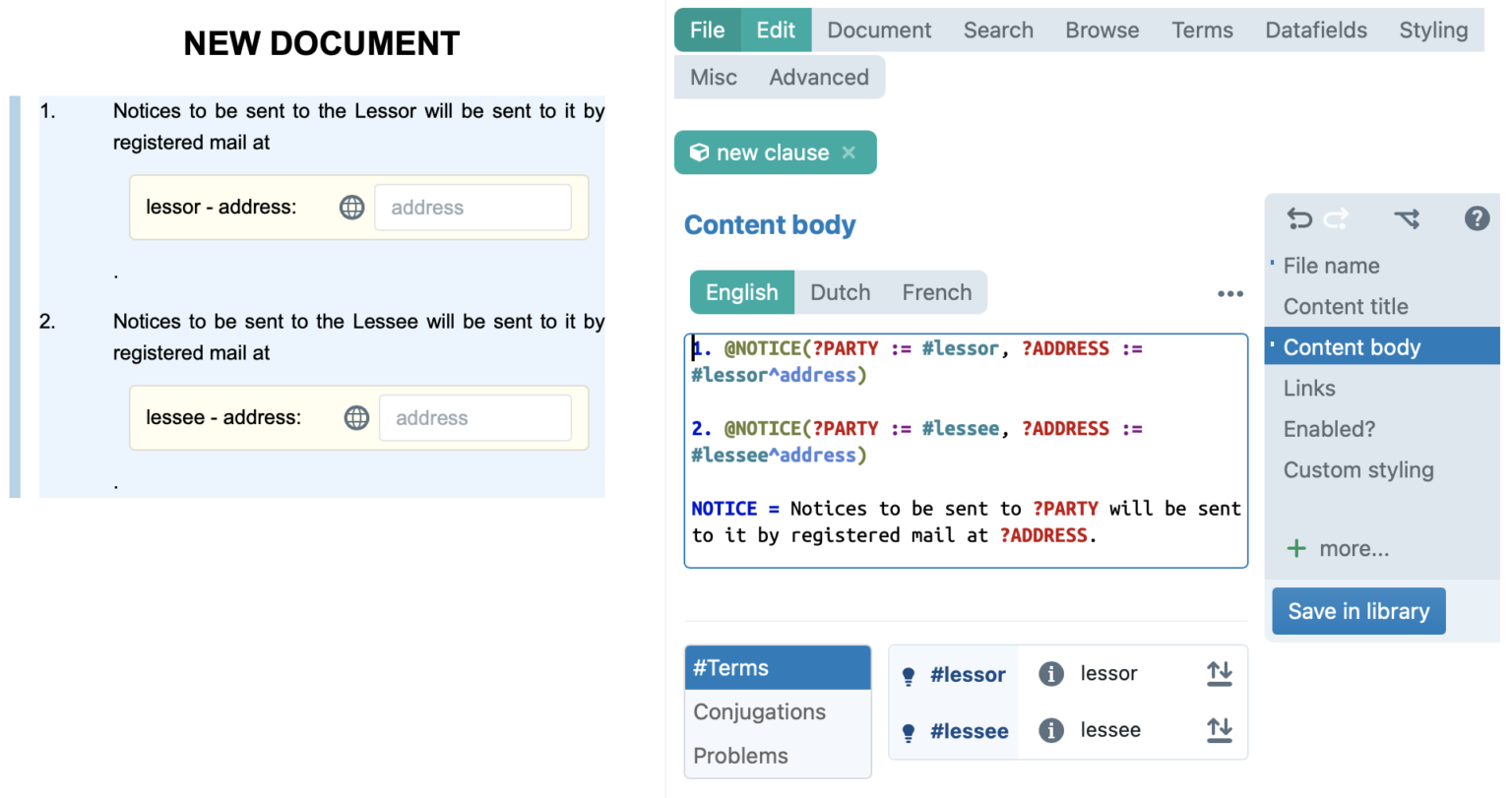
An example of a very simple notice clause will illustrate this:
Example of the use of parameters with an internal snippet.
---
# Agent Instructions
This documentation is published with GitBook. GitBook is the documentation platform designed so that both humans and AI agents can read, navigate, and reason over technical content effectively. Learn more at gitbook.com.
## Querying This Documentation
If you need additional information that is not directly available in this page, you can query the documentation by asking a question.
Perform an HTTP GET request on the following URL with the `ask` and `goal` query parameters:
```
GET https://help.clause9.com/clauses/parameters.md?ask=&goal=
```
`ask` is the immediate question: it should be specific, self-contained, and written in natural language.
`goal` is what the user is ultimately trying to achieve, the reason they need the answer. Sharing it helps GitBook give you a better, more relevant answer. A goal is most helpful when it describes the outcome the user wants rather than restating the question. For example, with `ask=how do I create an API token`, a goal like `automate deployments from our CI pipeline` lets GitBook tailor the answer to that use case.
The response will contain a direct answer to the question and relevant excerpts and sources from the documentation.
Use this mechanism when the answer is not explicitly present in the current page, you need clarification or additional context, or you want to retrieve related documentation sections.